
Customer Tracking
Let customers check their own order status, any time, without calling you.
Last updated 31 October 2026
Every order has a tracking link that shows its live stage, like a courier tracking page. Share it on WhatsApp when the order is booked and customers can check progress themselves.
Your team spends less time answering "where is my glass?" calls, and customers trust you more because they can see the work moving.
- Public tracking page per order
- A link you can share on WhatsApp
- Stage-wise progress view
- No login needed for customers
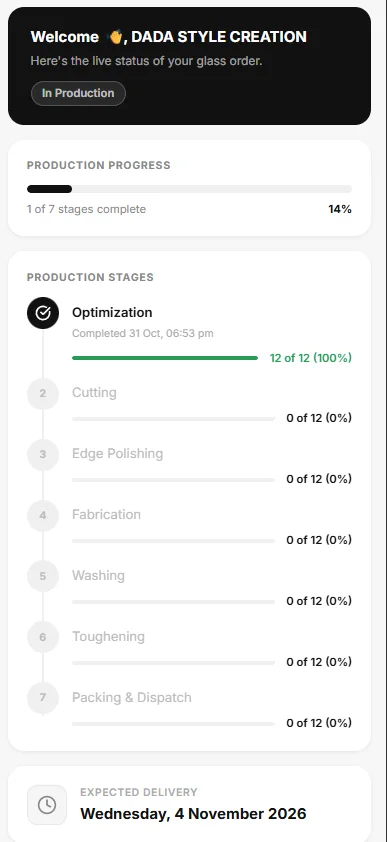
What a customer sees
The tracking page greets the customer by name, shows the order status (for example "In Production"), and a progress bar such as "1 of 7 stages complete, 14%". Below it, the stages are listed with the completion time of each finished stage and a count such as "12 of 12 (100%)", then the expected delivery date at the bottom.
No login, one link
Each order has its own tracking link. A customer opens it on a phone with no account, and the office can open the same page from the order with the Customer View button to see exactly what the customer sees. The link is easy to send on WhatsApp.
Fewer calls to the office
The common question, "where is my glass?", is answered by the page instead of by a person. The customer sees real stage counts from the floor, not an estimate typed by someone in the office.
Questions about customer tracking
Not here? Ask us on WhatsApp or book a demo and bring your own order.
Does the customer need to sign up?
No. The tracking link works without an account or password.
Can I see what the customer sees?
Yes. The order has a Customer View button that opens the same page.
Does it show the delivery date?
Yes. The expected delivery date is shown at the bottom of the tracking page.