
Glass Design Studio
Turn a customer sketch into an exact production drawing in minutes.
Last updated 31 October 2026
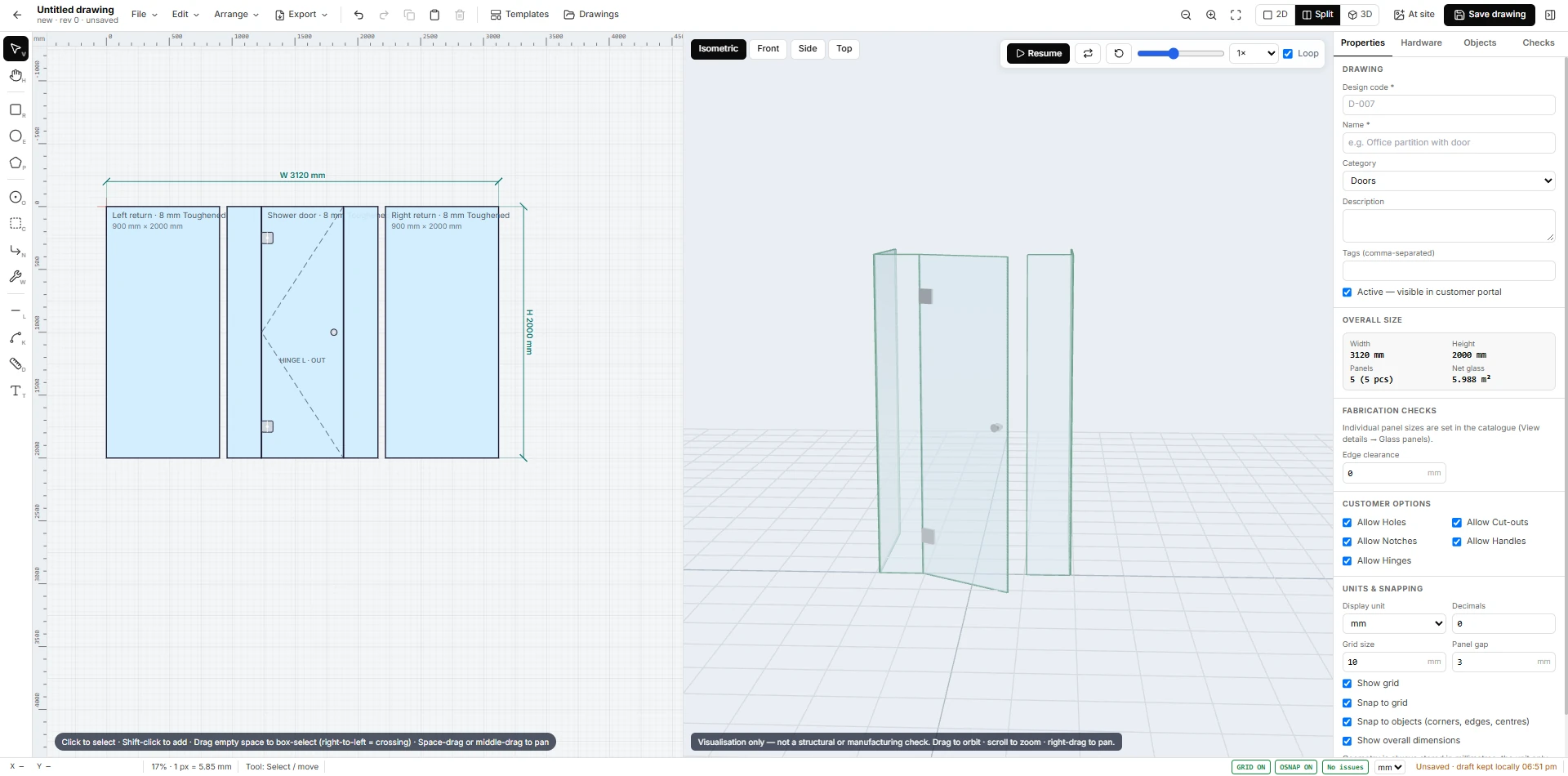
The built-in drawing studio lets you place holes, notches, cutouts and hardware fittings on a glass panel with exact dimensions. Drawings are saved with revisions, so changes never get lost.
Dealers and architects can use their own portal to browse the catalogue, create drawings and place orders, which flow straight into production.
- Holes, notches and cutouts to the millimetre
- Hardware library for fittings
- Revision history for every drawing
- Customer portal for dealers
Draw in 2D and see it in 3D at the same time
The studio shows the drawing and a 3D view side by side. A shower enclosure with a door and two returns, for example, is drawn as flat panels with the hinge swing marked, and the 3D view shows the glass standing. Views switch between 2D, Split and 3D, and the 3D view can be set to Isometric, Front, Side or Top.
Holes, notches, cutouts, hinges and handles
Each drawing records its design code, name and category (for example Doors), the overall width and height in millimetres, the number of panels and the net glass area. Customer options let you allow holes, cut-outs, notches, handles and hinges. Edge clearance, grid size, panel gap and snapping are set per drawing, and a Checks tab lists issues before the drawing is saved.
Hardware, templates and the customer portal
A hardware tab holds the fittings, a Templates menu starts a new drawing from a known shape, and drawings keep a revision number. A drawing marked Active becomes visible in the customer portal, where dealers and architects can browse and order. The studio is for visualisation, and it states that it is not a structural or manufacturing check.
Questions about glass design studio
Not here? Ask us on WhatsApp or book a demo and bring your own order.
Can my dealers draw their own glass?
Yes. Drawings marked Active are visible in the customer portal, and the options you allow (holes, notches, cut-outs, handles, hinges) decide what a customer can change.
Does it check that a drawing can be made?
It has a Checks tab and edge-clearance settings. It is a visualisation tool, not a structural or manufacturing approval, and says so on screen.
Are drawing changes kept?
Yes. Each drawing has a revision number, so earlier versions are not lost.