
Glass Inventory
Know exactly how many sheets you have, before you promise a delivery date.
Last updated 31 October 2026
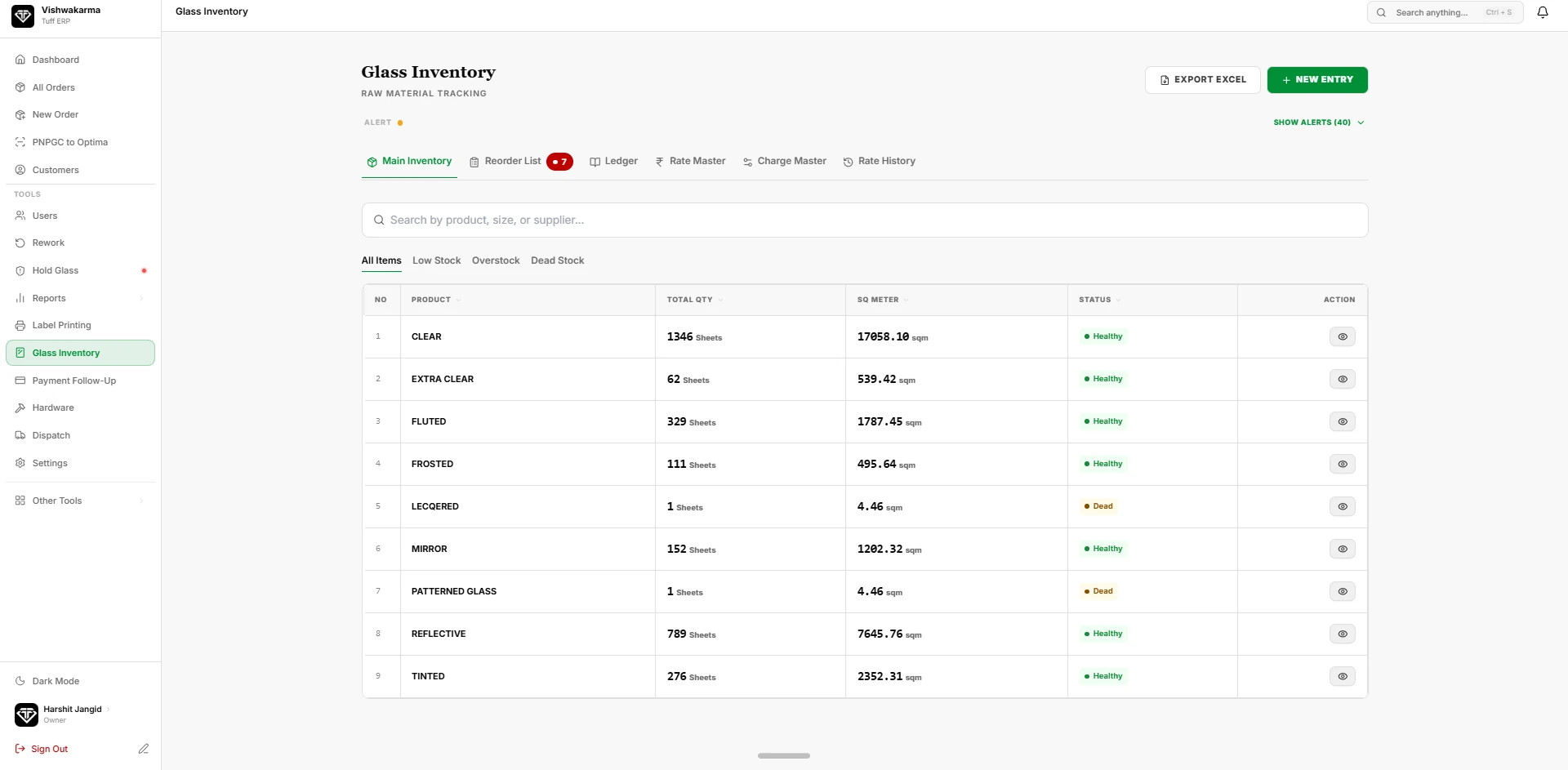
Every raw sheet that comes in is entered by glass type, colour, thickness and size. As pieces are cut, stock goes down automatically, so the store and the office always see the same count.
Usable off-cuts are saved with their size instead of being thrown away. When a new order needs a small piece, the system shows matching off-cuts first, so you buy less glass for the same work.
- Stock by glass type, thickness and size
- Automatic stock-out as pieces are cut
- Off-cut register for reuse
- Low-stock view before you accept orders
Raw glass stock in sheets and square metres
The Main Inventory table lists every glass product with its total quantity in sheets and its area in square metres, plus a status such as Healthy or Dead. A typical list covers clear, extra clear, fluted, frosted, lacquered, mirror, patterned, reflective and tinted glass. Tabs filter the list to All Items, Low Stock, Overstock and Dead Stock.
Reorder list, ledger and rates
A Reorder List tab shows the items that have fallen below their limit, with a count badge so nobody misses it. The ledger records stock movements, and separate tabs hold the rate master, the charge master and the rate history. New purchases are added with New Entry, and the whole table exports to Excel.
Off-cuts the cutting team can find
Cutting staff have their own screens for Glass Inventory and Off Cut. A usable off-cut is recorded instead of being forgotten in a corner, so it can be picked for a small piece before a new sheet is opened.
Questions about glass inventory
Not here? Ask us on WhatsApp or book a demo and bring your own order.
Does the stock go down when glass is cut?
The worker screens for cutting and inventory are connected to the same stock list, so the sheets used appear against the items. Ask us to show the exact flow with your own glass types.
Can I see dead or overstocked glass?
Yes. The inventory list has filters for Low Stock, Overstock and Dead Stock, and a status for each item.
Can I export the stock list?
Yes. There is an Export Excel button on the inventory screen.