
Reports & Backup
Run the factory on numbers, and never lose them.
Last updated 31 October 2026
The dashboard shows the area cut, fabricated and toughened, rework, delayed orders and glass stuck in process, for today, yesterday or the last 7 or 14 days.
Your data is stored in a secure cloud database with role-based access. Backups can be taken and restored from settings, including uploaded documents.
- Square metres cut, fabricated and toughened
- Cutting, toughening and dispatch reports
- Owner and worker logins
- Backup and restore in Settings
The owner dashboard
The dashboard shows the orders in the chosen period, total square metres, rework, delayed orders, glass stuck for more than 48 hours, super urgent orders, the area cut, the area fabricated and the area toughened, with a quick switch between Today, Yesterday, 7 Days and 14 Days. A Stats tab sits next to it for charts.
Reports for each part of the plant
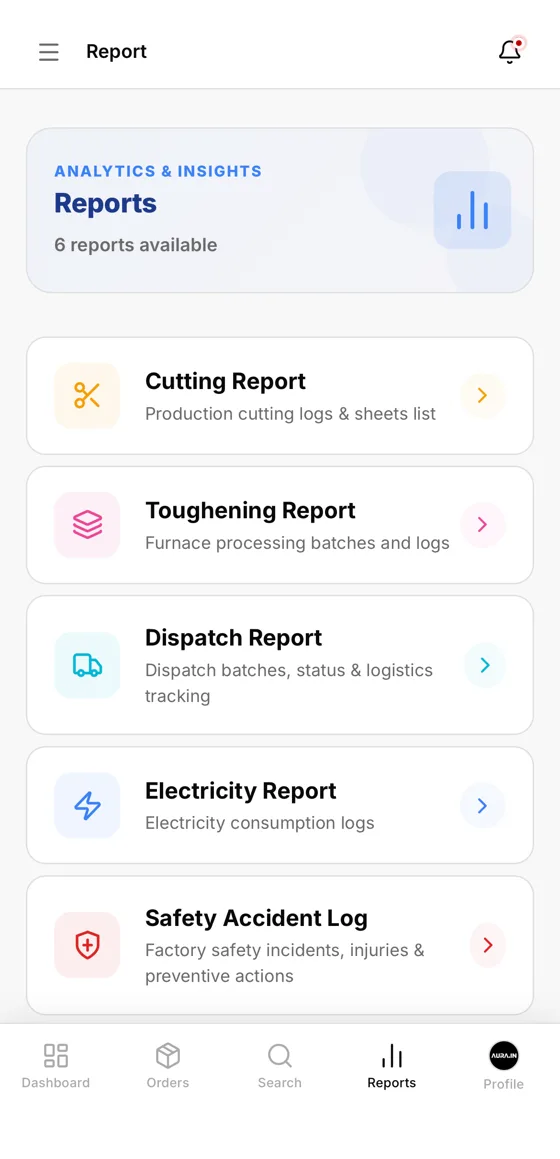
The Reports menu lists the Cutting Report (cutting logs and sheets list), the Toughening Report (furnace processing batches and logs), the Dispatch Report (batches, status and logistics), an Electricity Report (consumption logs) and a Safety Accident Log (incidents, injuries and preventive actions).
Backup and restore
Backup and restore are built into Settings and include uploaded documents. Access is split into Owner or Manager and Worker logins, and workers only see the screens for their stage.
Questions about reports & backup
Not here? Ask us on WhatsApp or book a demo and bring your own order.
Can I see today's square metres cut and toughened?
Yes. The dashboard shows the area cut, fabricated and toughened for the period you choose.
Are electricity and safety records included?
Yes. There is an Electricity Report and a Safety Accident Log in the Reports menu.
Can I restore the data?
Yes. Backup and restore are in Settings, including the uploaded documents.